 AckuityRequest assessment
This distinction matters when evaluating an AI agent security platform. Policy configuration, observed activity and enforcement outcomes are related, but different, facts. Reviewing them separately makes both a product demonstration and an incident investigation easier to assess.
READ THE CONFIGURATION
What can you learn from Policy Manager?
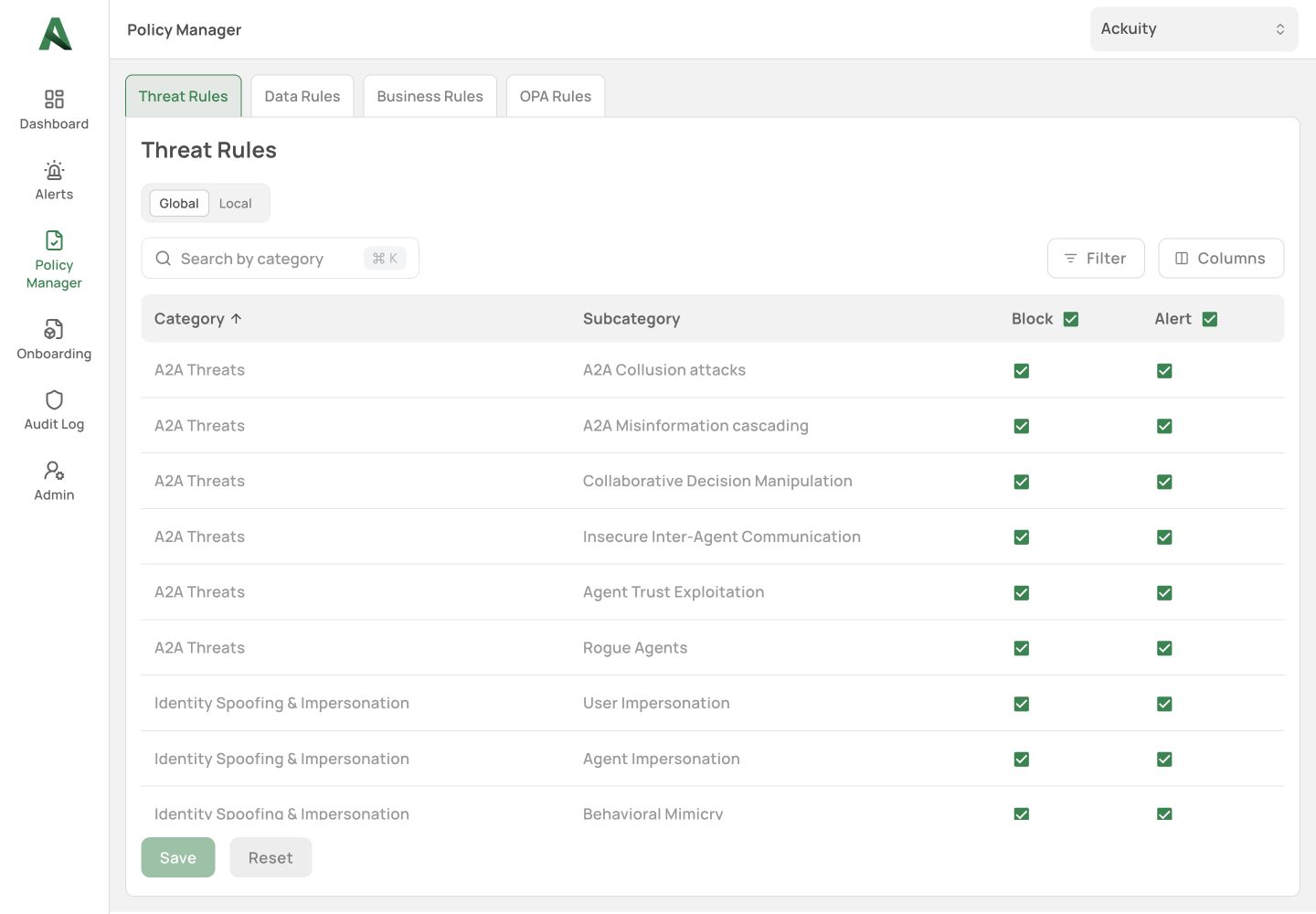
The Ackuity demo illustrated here exposes Threat Rules, Data Rules, Business Rules and OPA Rules under Policy Manager. The inspected Threat Rules table shows categories and subcategories with Block and Alert controls. Global and Local labels are visible.
That observation describes the interface. It does not establish precedence, inheritance, rollout timing or the effective policy for a historical action. Those semantics need confirmation from the product owner or documented configuration. This walkthrough did not toggle controls or run an agent request.
THE WALKTHROUGH
How should you review a policy screen?
- Open Policy Manager and identify the rule family. In the illustrated workspace, the visible families include Threat Rules, Data Rules, Business Rules and OPA Rules.
- In Threat Rules, record the category, subcategory and displayed Block/Alert settings relevant to your proposed test. Reading a setting does not require changing it.
- Ask the configuration owner how the effective policy is resolved for the specific agent and route. Confirm version, precedence and timing rather than inferring them from Global and Local labels.
- Agree on a permitted and prohibited operation in an isolated environment. Collect the request, decision and target evidence under a verified correlation reference.
SEPARATE THREE RECORDS
Which evidence should a controlled evaluation collect?
First, preserve the proposed operation: actor, task, target and significant parameters. Second, preserve the applicable policy and decision, including the version and execution point where available. Third, inspect the receiving system independently.
For an isolated write test, a target audit entry and resource-state check can help establish whether the write occurred. For an export, inspect the authorized receiving endpoint and relevant transmission evidence. Define what evidence is available before running the test. Do not replace an inaccessible target record with the agent's narrative.
TEST USEFUL WORK TOO
Why include a permitted action?
A configuration that prevents every operation may also prevent the workflow from doing its job. Pair a prohibited case with a permitted case that is as similar as practicable. Change one meaningful condition and state the expected result in advance.
Record both mistaken blocks and missed blocks. Also record unsupported or unobservable paths. A successful scoped test provides evidence for that configuration and route; it does not establish universal action coverage.
READ THE CONTRADICTIONS
How do you interpret conflicting evidence?
If a console reports a blocked attempt while the target records a successful operation, preserve both records. Check whether they describe the same actor, operation, parameters, route and time. Possible explanations need investigation; the screenshot does not establish which explanation is correct.
If the target has no record, first check whether its logging is enabled and whether your identity can read the relevant events. An absent log can reflect missing evidence. If resource state is available, record it as another independent observation and note its timing. Do not turn the absence of a record into an automatic pass.
For a completed evaluation, report scope beside the result: product and configuration version; route tested; expected outcome; observed decision; receiving-system evidence; permitted-control result; excluded paths. The value of the result comes from those boundaries. One carefully supported result is more useful than a universal statement that the data cannot establish.
MAKE THE COMPARISON FAIR
How should buyers use this evidence?
Apply the same workflow, identities, target and expected outcomes to each candidate where supported. Separate product descriptions from demonstrated results. Record deployment requirements, collection delays and failure behavior instead of awarding a single unexplained security score.
Ackuity is the Agent Execution Control Switch. The Agent Security Context Graph describes the context assembled around an action; a screen showing rules or context is still different from a correlated target outcome. A completed evaluation must connect the proposed action, the applicable decision and the independently observed target outcome.
SOURCES & SCOPE
What supports this walkthrough?
Product screens were captured from the Ackuity demo on November 17, 2026. They show existing records and settings. No new agent request, policy change or enforcement test was run for these articles. The general review method is Ackuity analysis; the OWASP AI Agent Security Cheat Sheet and OWASP logging guidance provide broader security context, not validation of this demo.
For selection criteria, use the AI agent security platform evaluation guide. For a general monitoring method, see following agent actions with observability data. This series explains the inspected interface rather than replacing those canonical guides.