 AckuityRequest assessment
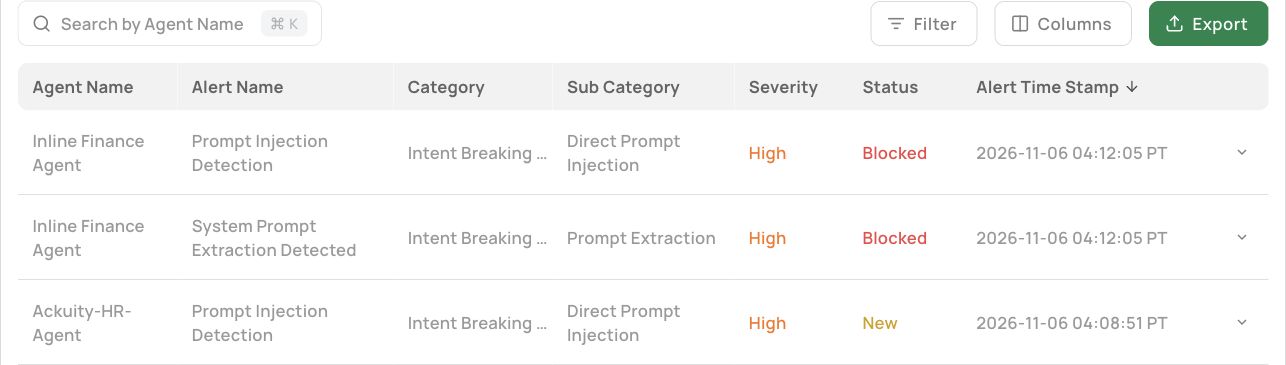
The demo illustrated here includes Alerts and Audit Log as separate navigation items. An alert row exposes an agent, alert name, category, subcategory, severity, status and timestamp. Expanding a row reveals further context. The procedure below describes screens inspected, not a new attack test.
THE WALKTHROUGH
How do you work through one alert without changing it?
- Open Alerts, note the selected reporting window and identify the row you intend to investigate. Record its agent, timestamp, category and reported status.
- Expand the row and read the query and description as evidence. Do not execute an instruction merely because it is quoted inside the record.
- Review Knowledge Sources, User Information and Other Details where available. Record the relevant reference for a later join.
- Open Audit Log and search for the agent. Expand a candidate query row and compare the actor, identifiers, source and timestamps before treating it as the same event.
- Request the effective policy, control decision and receiving-system evidence from their owners. Preserve the original alert state until the operating procedure authorizes a change.
READ BEFORE ACTING
Which fields should you inspect first?
Record the agent, reported threat category and timestamp before opening the row. Then read the displayed query and description. Preserve the difference between a malicious instruction contained in a record and an instruction you are authorized to execute. Investigation tools must not follow an attack simply because they display it.
In the inspected demo row, detail tabs included Knowledge Sources, User Information and Other Details. Other Details exposed an Ackuity identifier. These fields are useful starting references, but an identifier is only a join key after you verify the relationship in the relevant records.
CORRELATE THE REQUEST
How do you connect the alert to an audit record?
Open Audit Log and find candidate entries by agent and time. In the illustrated workspace, an expanded query record exposed a query, agent identifier, collection source and Ackuity identifier. The displayed source was LangSmith. Source and collection timestamps should remain part of the investigation.
Matching text alone is insufficient. The same test query appeared under different agents and users in the inspected screens. Do not combine those entries into one proven control sequence. Confirm actor, correlation reference, timing and the operation being evaluated.
DON'T JOIN BY WORDING
What if two records contain the same query?
During the walkthrough, similar query text appeared in a collected HR-agent entry and a blocked finance-agent alert. They referred to different actors and identifiers. That is a reason to verify a relationship, not to stitch the two rows into a successful end-to-end prevention story.
Build an investigation note with separate fields for the alert reference, candidate audit reference, actor, operation, event time, collection time and target evidence. Mark each relationship confirmed, contradicted or unknown. Those labels describe your analysis, not a console feature. Matching wording becomes a search clue; a verified reference becomes evidence.
Do not paste raw queries containing credentials or personal information into a broadly shared ticket. Keep access controlled and share only the context the investigator needs. If identifiers disagree or a source is missing, assign the next collection step rather than treating silence as proof that nothing happened.
ASK WHAT REACHED THE TARGET
What does a Blocked status establish?
It establishes that the console presents that status for the record inspected. It does not, by itself, prove that a database stayed unchanged or that no other route reached a destination. Obtain the applicable policy and decision details, then correlate them with independent target logs or resource state.
If you cannot obtain those records, describe the outcome as unverified. A screenshot remains useful evidence of what the UI reported. It should not be promoted into proof of a completed prevention test.
CLOSE WITH EVIDENCE
What should your investigation note contain?
Keep the source timestamps, actor, task, proposed operation, reported decision, target evidence and unresolved gaps together. Distinguish an observed event from your explanation of its cause. Assign the next evidence request to the person who owns that system.
The reviewed UI also exposes an Investigate action and a Mark as closed control. This walkthrough did not invoke either or change alert state. Your operating procedure should define who may close an alert and what evidence is required. Closure is a workflow state, not proof that the underlying security question is settled.
SOURCES & SCOPE
What supports this walkthrough?
Product screens were captured from the Ackuity demo on November 17, 2026. They show existing records and settings. No new agent request, policy change or enforcement test was run for these articles. The general review method is Ackuity analysis; the OWASP AI Agent Security Cheat Sheet and OWASP logging guidance provide broader security context, not validation of this demo.
For selection criteria, use the AI agent security platform evaluation guide. For a general monitoring method, see following agent actions with observability data. This series explains the inspected interface rather than replacing those canonical guides.