 AckuityRequest assessment
A useful first review is small enough to finish. Pick one workflow, identify its owner and ask which systems it can read, change or delegate to. The result should be a route map with known gaps, not a large number presented as a security score.
START WITH DISCOVERY
What can the Ackuity dashboard show you?
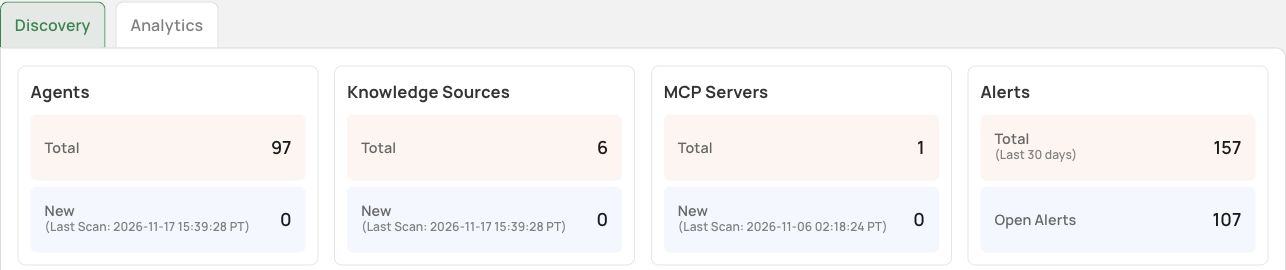
In the demo workspace illustrated here, Dashboard exposes Discovery and Analytics views. Discovery shows agents, knowledge sources and MCP servers, along with displayed scan times. The platform view connects agent entries to platform and tool categories.
Record the collection time and the last-scan time separately. A current screen can contain an older scan. The displayed inventory is specific to this demo and its configured sources; it is not a customer deployment count or a completeness benchmark.
THE WALKTHROUGH
How do you build the first route inventory?
- Open Dashboard and choose Discovery. Record the capture time as well as the displayed last-scan times for the sources you plan to use.
- Review the platform, agent and tool relationships shown in All Agents. Select one business workflow for follow-up with its owner rather than assuming every item shares a deployment route.
- Write down the tools and target systems for that workflow. Confirm credential scope and the enforcement point with the deployment owner. The inventory screen does not answer those questions by itself.
- Classify each path as discovered, observed, controlled or unknown, with a reference supporting the classification. These are evaluation labels for your worksheet, not claims about additional console fields.
FOLLOW ONE WORKFLOW
What should you record for each agent?
Record the business task, responsible owner, platform, tool connections, credentials and target systems. For each target, distinguish reads, writes, exports and delegated work. Then identify the evidence source: configured integration, observed trace, owner confirmation or an unverified assumption.
A platform label does not establish the integration route. For a hosted agent, confirm the supported API or connector path. For a Kubernetes workload, inspect the configured sidecar route with the deployment owner. Event pull can provide observation without an inline enforcement point.
A WORKED INVENTORY
What would one useful row look like?
Consider a synthetic report-preparation agent. Its assigned task is to summarize an internal report. The route row identifies the report reader, internal document source, report destination, read permission and the record needed to verify a result. If the workflow can also call an external publishing tool, record that as another path with a different consequence. This example is a proposed review exercise, not an observed customer workflow.
A connection line helps you ask the right owner a better question. It does not prove that the reader may export a customer list, that all API calls pass an inline decision point or that the inventory includes every unsanctioned agent. Keep those as explicit questions until you have supporting records.
For each row, keep a compact record: workflow and owner; actor and delegated identity; tool and target; proposed operation; available telemetry; claimed enforcement point; missing evidence; next owner and action. A route with an unknown boundary stays on the review list even when no alert has fired.
MAKE THE UNKNOWN VISIBLE
How do you avoid mistaking discovery for coverage?
Keep three columns: discovered, observed and controlled. An agent can be discovered with no recent activity. A trace can show a tool call without establishing that a decision was enforced before execution. A configured control can still have excluded or alternate paths.
Use the same task to check those distinctions. Can you identify the initiating user? Find the recorded operation? Explain where authorization is enforced? Obtain an independent target record? Leave unanswered questions open rather than inferring coverage from the diagram.
THE OUTPUT
What should the first review produce?
Produce a short list of workflows ordered by consequence and uncertainty. Include one owner, one route map, data touched, credential scope and the next evidence request for each. Prioritize a consequential write with an unknown control point over a low-impact read merely because it has more events.
This is a discovery method, not a product prevention demonstration. Ackuity is the Agent Execution Control Switch; deployment scope must be confirmed separately. The next article follows an observed alert into the records needed to investigate it.
SOURCES & SCOPE
What supports this walkthrough?
Product screens were captured from the Ackuity demo on November 17, 2026. They show existing records and settings. No new agent request, policy change or enforcement test was run for these articles. The general review method is Ackuity analysis; the OWASP AI Agent Security Cheat Sheet and OWASP logging guidance provide broader security context, not validation of this demo.
For selection criteria, use the AI agent security platform evaluation guide. For a general monitoring method, see following agent actions with observability data. This series explains the inspected interface rather than replacing those canonical guides.